A quick walkthrough
FICTIONAL EXAMPLE · AI-GENERATED PHOTOS · WRITTEN ILLUSTRATIVE FINDINGS
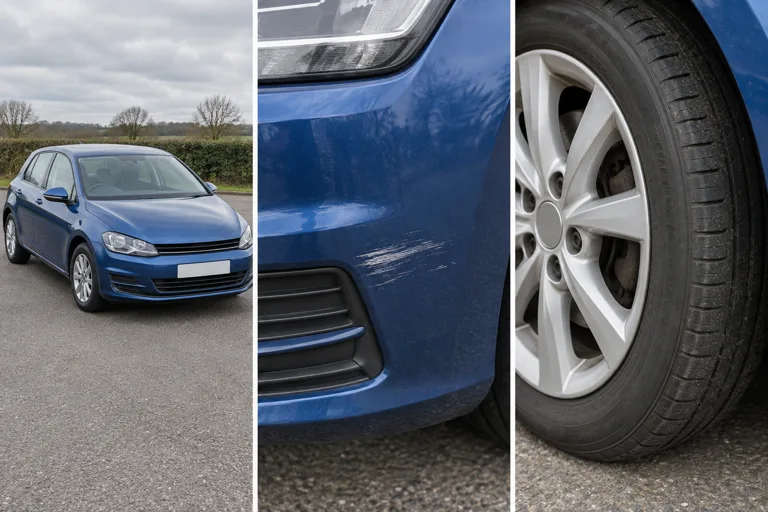
A blue family hatchback is advertised at £6,000 with 91,000 miles. The seller says “excellent condition” and “full service history”. Here is how the evidence fits together.
1 · Read the advert
A supported advert link or 1–3 screenshots supplies the cash price, mileage and visible seller claims. Check and edit the extracted values. Service history, warranty, recent work and keys remain seller claims until verified.
2 · Check the visible condition
The example bumper photo shows a scuff, which deserves a question about the “excellent condition” claim. The tyre photo does not establish tread depth. Follow 10 guided views, with optional interior photos; retake unclear views or keep them marked incomplete.
3 · Combine the evidence
This example retains an unresolved suspension advisory and missing service evidence. The combined assessment is CAUTION while tyre and photo coverage remain incomplete. Ask for repair invoices, service records and better tyre views before committing. Clean-looking paint does not clear a history risk.
What you need
- The car’s registration to buy and connect the vehicle report.
- An advert link or 1–3 clear screenshots. Auto Trader and CarGurus may block direct imports; screenshots are the fallback.
- Photos covering the bodywork, dashboard and four tyres. Use clear daylight and avoid personal documents or faces.
- JPG, PNG or WebP files up to 16 MB each. For HEIC/HEIF, export JPEG or use screenshots.
If the registration is hidden
You can prepare the advert details now. Ask the seller for the registration before paying and running image analysis. A hidden number plate cannot be recovered from a photo that does not show it.
What photos cannot tell you
These are AI-assisted observations of visible evidence, not a physical inspection. Photos cannot prove accident history, mechanical health or the absence of hidden defects. Limited evidence stays limited, and clean photos never remove recorded history risks.
Keep your review for the viewing
Text drafts stay in the same tab for up to two hours. CarSussed does not save the images. Download the review or print to PDF, then transfer that file to your phone. Browser-saved reports do not automatically sync between devices.
Already paid but cannot reconnect? Contact support before purchasing again.